
YoWindow Weather
Weather View LLCWeather
4.51.13K Reviews
- Version
- Varies With Device
- Installs
- 100.00K
- Age Rating
- Everyone
Screenshots
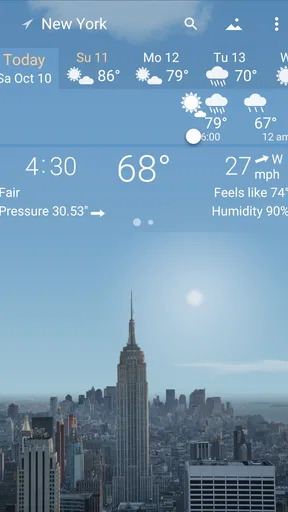
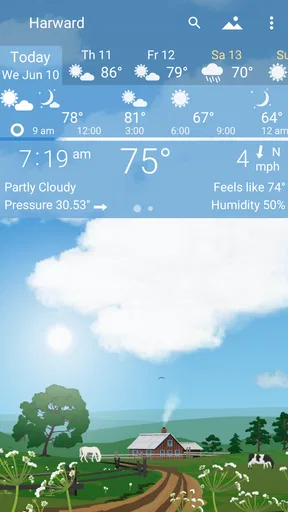
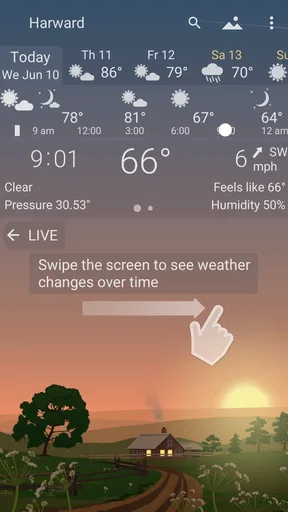
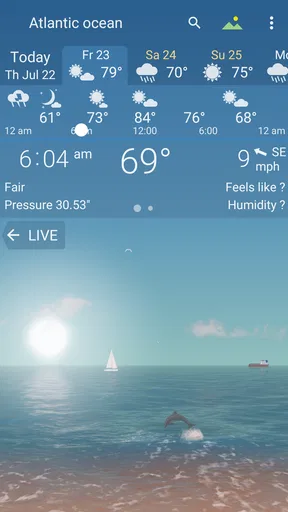

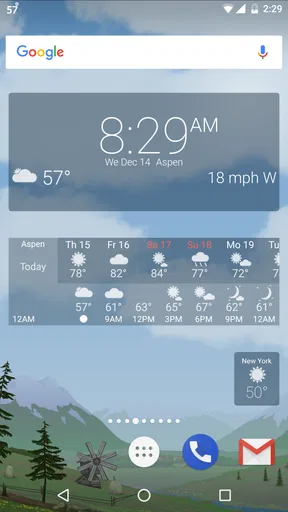
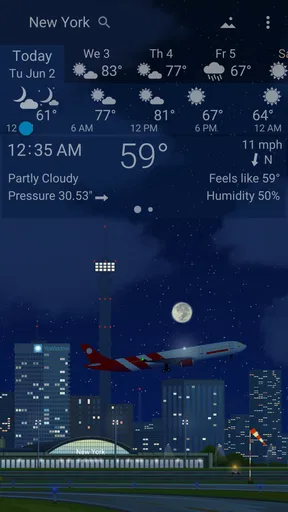
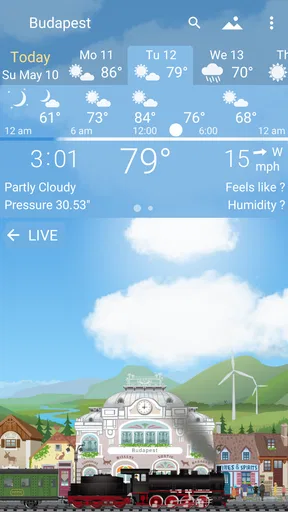
Our Review of YoWindow Weather
 Analysis by Appyee
I like weather apps that help me make a decision without turning a quick check into a chore. YoWindow Weather takes a more visual route than the usual rows of symbols and temperatures: its animated landscape reflects the conditions and the time of day, so I can get a feel for the weather at a glance. That makes it appealing when I want something pleasant to look at as well as a forecast, though its visual style is not automatically the best fit for every kind of weather check.
What a quick check feels like
For a simple question like “Should I take a jacket?” YoWindow’s landscape gives the forecast a more intuitive shape. Rather than interpreting several small icons first, I can watch the scene change and then use the forecast details to make a practical call. The motion and scenery give the app character, but they also mean that someone who wants only a compact number and a minimal screen may prefer a more conventional weather app.
The app is a paid weather app from Weather View LLC, priced at $5.99, with an Everyone content rating. It has an average rating of 4.5 from around 22,000 ratings and more than 100,000 installs. Those figures suggest it has found an audience, but I would treat the purchase as a choice of presentation as much as a choice of forecast: the main reason to pick it is the way it makes weather feel visible and approachable.
Speed expectations for everyday checks
When I open a weather app to check the day, I want the useful information to be easy to reach. YoWindow’s central scene is engaging, and sliding across the screen to follow changes through the day gives the forecast a hands-on feel. That interaction is better suited to browsing a timeline than to quickly scanning a dense page of figures. If I am already in a hurry, I may find a plain forecast screen faster to read; if I have a moment, the animated view makes checking the weather feel less mechanical.
I would think of its speed in terms of how quickly I can answer a question, not just how quickly an animation appears. A visual forecast can help me notice a change in conditions, while a list-based alternative can make exact values easier to compare. My practical tip is to use the landscape for the first impression, then move along the forecast timeline when the timing matters. That keeps the attractive presentation from becoming a distraction from the decision I actually need to make.
Useful when the day is uncertain
A realistic example is deciding what to do before leaving home when the weather may shift. I can look at the current scene, then slide through the day to see how the conditions are expected to change. If I am planning a walk, a commute, or time outdoors, that sequence is more useful than treating the current weather as the whole story. It encourages me to check the part of the day I will actually be outside rather than making a plan from one glance.
The same habit helps with small decisions that are easy to overlook: whether to carry an umbrella for an afternoon errand, whether a morning outing is likely to feel different from the evening, or whether to move an outdoor plan to another part of the day. The landscape is a friendly way to start that check, not a substitute for reading the forecast carefully when timing matters. I would use the daily timeline for those choices and the week view when I am only sketching out plans ahead.
The First Impression
When I first downloaded YoWindow Weather, I was immediately captivated by its stunning visuals. Unlike the typical weather apps that bombard you with numbers and icons, YoWindow presents the weather in a visually immersive way. Imagine looking at a serene countryside or a bustling cityscape that reflects the current weather conditions, whether it's raining cats and dogs or the sun is shining bright.
Setting it up was a breeze. I just selected my location, and boom—there was my local weather, beautifully animated on my screen. The interface is incredibly user-friendly, so even if you're not tech-savvy, you'll have no trouble navigating through the app.
Features That Stand Out
Now, let’s get into the nitty-gritty of the features. One of the coolest features is the “live landscape” that changes based on the weather and time of day. If it’s nighttime in real life, it’s nighttime in YoWindow too. The app even shows the phase of the moon and the time of sunset and sunrise. It’s like having a little slice of nature in your pocket.
Another feature I love is the weather forecast. You can slide your finger across the screen to see how the weather will change throughout the day. It’s incredibly intuitive and fun to use. Plus, the app provides detailed forecasts for the upcoming week, so you can plan your adventures accordingly.
Oh, and did I mention the sound effects? When it rains in YoWindow, you’ll hear the gentle pitter-patter of raindrops. It’s these little touches that make the app so immersive and unique.
Performance and Usability
Performance-wise, YoWindow runs smoothly on both Android and iOS. I didn’t experience any lag or crashes, which is always a plus. The app is also regularly updated, ensuring that any bugs are quickly squashed and new features are added.
Usability is another strong point. The settings allow you to customize the app to your liking, from choosing different landscapes to setting the units of measurements. Whether you prefer Celsius or Fahrenheit, YoWindow’s got you covered.
When the screen gets busy
The app’s best qualities can also shape when I choose to use it. A moving scene, sound effects, and a forecast timeline make for a more involving check than a static list. That is enjoyable when I am exploring the forecast, but it may not suit someone who wants the least visual activity possible or who tends to check weather repeatedly in short bursts. In that situation, a simple widget or a stripped-back forecast app may be easier to consult.
For heavier use, I would keep the purpose of each check in mind. If I am comparing several days, I can use the week forecast to plan broadly; if I need to know what to expect in a specific part of today, the sliding timeline is the more useful view. I would not keep replaying the scenery just for its own sake when a quick glance is enough. The practical trade-off is clear: YoWindow makes weather more engaging, while a data-first app may expose details more compactly.
Reliability and realistic expectations
Weather forecasts are estimates, so I treat any app’s outlook as guidance rather than a promise. YoWindow’s presentation can make a change in conditions easy to notice, but the animated scene should not be mistaken for a guarantee about exactly what will happen at my address. For plans where conditions matter, I check the forecast again closer to the time and pay attention to the period I will be outdoors.
I also separate visual reliability from forecast reliability. A scene that changes with the weather and time gives the app a coherent feel, while the forecast itself is what I use to plan. That distinction matters most when conditions are changeable: an attractive landscape helps me understand the broad picture, but I would not base a safety-sensitive decision on a visual impression alone. For ordinary errands and casual plans, the combination is convenient; for decisions that depend on precise, timely detail, I would compare it with a more data-dense source.
Device fit and the cost decision
YoWindow is available on Android and iOS, so it can suit someone who switches between those platforms or wants the same general style of weather check across devices. Its animated presentation is the defining choice, though, and not every device or viewing habit benefits from that emphasis. If I prefer a quiet screen, read forecasts in a hurry, or usually keep a weather widget rather than opening an app, the extra visual character may matter less to me than a compact layout.
The $5.99 price makes the buying decision worth considering before I install it. I would pay for the experience if I enjoy the landscapes, like exploring the day’s forecast by touch, and expect to open the app regularly. If I only need a temperature and a quick chance-of-rain check, a free or simpler alternative may be a better match. The price is easiest to justify when the presentation itself is part of what I want, rather than when I am comparing apps only by how many figures fit on one screen.
Who will enjoy it—and who may prefer another app
I can see YoWindow working especially well for people who find ordinary weather screens dull, enjoy visual details, or like to explore how the day may unfold. The changing scene gives a weather check a little atmosphere, and the sunrise, sunset, and moon details add reasons to look beyond the immediate temperature. It also suits someone who wants a forecast they can browse interactively instead of reading as a fixed block of information.
I would steer a reader toward a more traditional option if they want a highly compact display, need to compare lots of numerical details at once, or rarely open a dedicated weather app. Someone who only checks conditions from a notification or a small widget may not spend enough time in YoWindow to appreciate its central feature. That is not a flaw so much as a difference in priorities: the app is strongest when its visual approach makes you more willing to look at the forecast.
Performance and Usability
Performance-wise, YoWindow runs smoothly on both Android and iOS. I didn’t experience any lag or crashes, which is always a plus. The app is also regularly updated, ensuring that any bugs are quickly squashed and new features are added.
Usability is another strong point. The settings allow you to customize the app to your liking, from choosing different landscapes to setting the units of measurements. Whether you prefer Celsius or Fahrenheit, YoWindow’s got you covered.
Is It Worth Downloading?
So, is YoWindow Weather worth the download? Absolutely! It’s more than just a weather app; it’s a delightful way to stay informed about the weather. Whether you’re a weather enthusiast or just someone who likes pretty things, YoWindow is bound to impress you.
In conclusion, if you’re tired of the mundane and want a weather app that brings a smile to your face every time you check it, give YoWindow Weather a try. It’s like having your own personal weather station, with a touch of magic and a whole lot of charm.
Ready to transform your weather checking experience? You can download YoWindow Weather from the App Store or Google Play and see the weather in a whole new light. Trust me, you won’t regret it!
My final performance verdict
For me, YoWindow’s strongest performance quality is how it turns a routine check into something I might actually enjoy opening. The interactive forecast and animated landscape reward a little attention, while its appeal is less obvious if I only want to read one number and close the screen. I would use it for everyday planning, especially when I want to see how conditions may change across the day, but I would choose a more compact alternative when speed of scanning matters more than presentation.
Weather View LLC’s app has been available since April 15, 2014, and its established audience is reflected in roughly 1,100 reviews alongside its ratings. I find the overall choice simple: pay for a visual, atmospheric way to explore weather, or stick with a conventional forecast if efficiency and dense information are the priority. YoWindow is at its best when its scenery adds pleasure to a useful habit, not when the animation is expected to replace careful forecast reading.
Verdict
Strengths of YoWindow Weather
- Beautiful and interactive weather animations.
- Customizable backgrounds and themes.
- Accurate weather forecasts and updates.
- Easy-to-use interface with intuitive navigation.
- Integrates with multiple weather services.
Limitations of YoWindow Weather
- Ads can be intrusive in the free version.
- Limited location settings in the free tier.
- Battery consumption is slightly high.
- Some advanced features require a subscription.
- Occasional lag in animation load times.
Similar Picks in This Category
View All
Weather - By Xiaomi
Xiaomi Inc.4.1

Weather & Radar Forecast
WetterOnline4.8

Weather
OneLouder Apps4.6

AccuWeather: Weather Radar
AccuWeather3.6

The Weather Channel - Radar
The Weather Channel4.6

1Weather Forecasts & Radar
OneLouder Apps4.3
Frequently Asked Questions
What features does YoWindow Weather offer?
YoWindow Weather provides a unique and interactive way to check the weather with its live landscape feature that mirrors real-time weather conditions. It includes detailed forecasts, such as temperature, wind speed, and humidity. Users can view weather predictions over several days, enhancing planning for future activities.
Is YoWindow Weather available for both Android and iOS devices?
Yes, YoWindow Weather is available on both Android and iOS platforms. The app can be downloaded from the Google Play Store for Android users and the App Store for iOS users, offering a consistent experience across different devices while utilizing platform-specific features.
Does YoWindow Weather require an internet connection to function?
YoWindow Weather primarily requires an internet connection to provide real-time weather updates and forecasts. However, once the data is downloaded, users can view the most recent updates offline, allowing for some flexibility in accessing weather information without constant internet access.
Are there any in-app purchases or advertisements in YoWindow Weather?
YoWindow Weather offers a free version supported by advertisements. There is also a premium version available through in-app purchases, which removes ads and provides additional features like extended forecasts, making it a worthwhile investment for those seeking an ad-free experience.
How accurate is the weather data provided by YoWindow Weather?
YoWindow Weather sources its data from reliable weather services, ensuring a high level of accuracy. While no weather app can guarantee 100% precision, users generally find YoWindow’s forecasts to be dependable for daily and weekly planning. The app's visual representation further enhances user understanding of weather changes.
